 Skip to content
Expert Site Architecture to Improve Indexing & Structure means designing a website so search engines and users can navigate it easily. It focuses on clear website structure, logical site hierarchy, and strong internal linking.
This approach helps search engines crawl pages faster and understand content relationships better. Clean URL structure, simple navigation, and proper XML sitemaps guide search engine indexing.
When experts handle site architecture, important pages stay visible and accessible. This reduces crawl errors, improves technical SEO performance, and creates a solid foundation for long-term search rankings and user experience.
Websites often fail because search engines cannot understand their structure. Expert Site Architecture fixes indexing, crawlability, and long-term SEO performance.
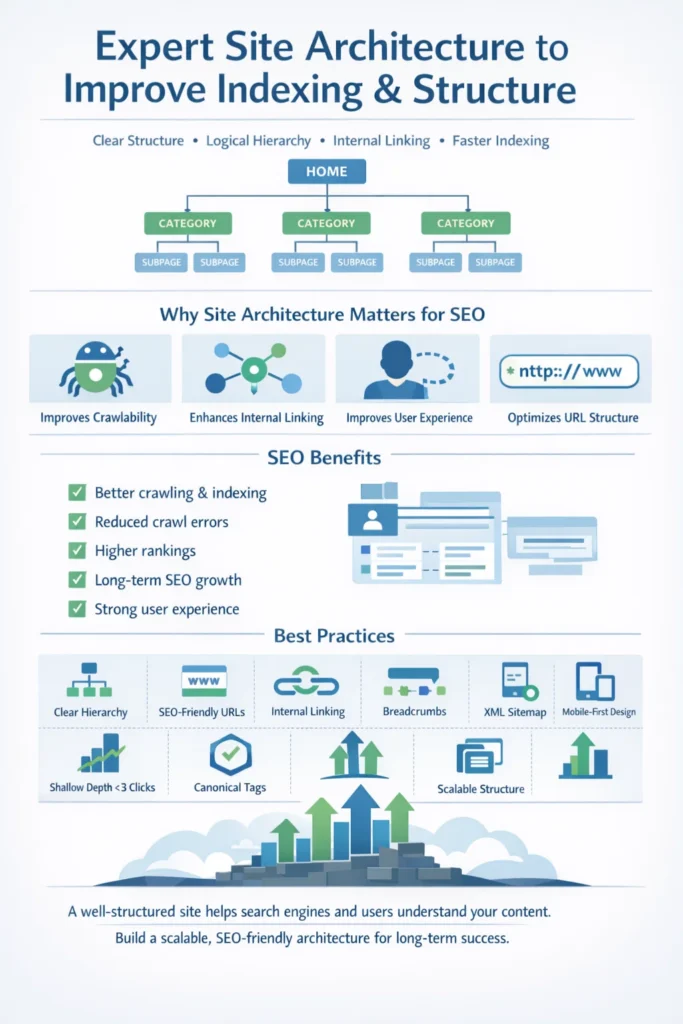
Why Does Site Architecture Matter for SEO?
Site architecture plays a crucial role in SEO because it determines how search engines and users navigate your website. A well-structured site helps search engines crawl and index content efficiently, while making it easy for visitors to find what they need. Poor architecture can hide important pages, reduce rankings, and frustrate users, directly affecting your website’s performance and authority.
Improves Crawlability
Search engines rely on bots to explore your website. If pages are buried deep or poorly linked, these bots may miss valuable content. A clear site structure ensures that every page is accessible within a few clicks from the homepage. This improves crawl efficiency, helps search engines index all relevant pages, and boosts your chances of ranking higher for target keywords.
Enhances Internal Linking
Internal linking connects related pages, creating a web of content that search engines can understand. Strategic internal links help distribute page authority across your website. This not only strengthens individual pages but also signals topic relevance to search engines. A well-linked structure supports better indexing and improves your site’s overall SEO performance.
Improves User Experience
A logical site structure is not just for search engines—it directly benefits users. Clear navigation, menus, and breadcrumbs help visitors find content quickly. Better user experience leads to lower bounce rates and longer session durations. Search engines recognize these positive signals, which can further improve your rankings.
Optimizes URL Structure
Clean and descriptive URLs are a key element of effective site architecture. They help both users and search engines understand the content of each page. Proper URL hierarchy, organized folders, and keyword-rich URLs improve indexing accuracy. Additionally, readable URLs increase click-through rates and enhance user trust.
10 Site Architecture Best Practices with Examples
A well-planned site architecture is the foundation of a successful website. It helps search engines index your pages efficiently while making navigation easy for visitors. Poor structure can hide important content, hurt rankings, and reduce user engagement. Here are 10 proven site architecture best practices, explained with practical examples.
1. Plan a Clear Site Hierarchy
A site hierarchy organizes your pages from broad categories to specific subpages. For example, an e-commerce store might follow:
Home > Electronics > Smartphones > Android Phones.
This structure ensures that search engines understand which pages are most important and helps users find content quickly. Keeping key pages closer to the homepage improves indexing and authority flow across your site.
2. Use Descriptive, SEO-Friendly URLs
Your URLs should be short, readable, and descriptive. For instance:
www.example.com/blog/seo-tips is much better than www.example.com/page?id=123.
Clean URLs improve user trust, click-through rates, and make it easier for search engines to crawl and index pages. Avoid unnecessary numbers, symbols, or dynamic parameters.
3. Optimize Internal Linking
Internal links connect related pages, helping both users and search engines navigate your site. For example, a blog about “Site Architecture” could link to pages like “Technical SEO Tips” or “Internal Linking Strategies.” Proper linking helps distribute page authority, improves crawlability, and guides visitors to other useful content, increasing engagement and time on site.
4. Implement Breadcrumb Navigation
Breadcrumbs show users their path within your site hierarchy, such as:
Home > Services > SEO > Site Architecture.
They enhance user experience, reduce bounce rates, and give search engines additional context about page relationships. Breadcrumbs are especially useful for large websites with multiple categories and subcategories.
5. Create an XML Sitemap
An XML sitemap lists all important pages and acts as a roadmap for search engines. For example, submitting a sitemap through Google Search Console ensures that your new or updated pages are indexed quickly. Keeping the sitemap updated helps search engines discover content efficiently, improving crawl coverage and overall SEO performance.
6. Prioritize Mobile-Friendly Design
With mobile-first indexing, your mobile site architecture is critical. A responsive design that maintains clear hierarchy, navigation, and internal linking ensures visitors can easily navigate on smartphones and tablets. Mobile-friendly architecture improves user experience, increases session time, and helps search engines crawl your site more effectively.
7. Use a Logical Navigation Menu
Your main navigation should reflect the site hierarchy and include only essential pages. For example:
Home | Services | About Us | Blog | Contact.
Clear navigation helps visitors find key information quickly and allows search engines to crawl your most important pages efficiently, improving rankings and usability.
8. Avoid Deep Nesting
Pages buried too deep make crawling harder for search engines and navigation difficult for users. For instance, avoid:
Home > Category > Subcategory > Sub-Subcategory > Product Page.
Important pages should ideally be no more than 3 clicks from the homepage, ensuring both users and search engines can access them quickly.
9. Use Canonical Tags for Duplicate Content
Duplicate content can confuse search engines and hurt SEO. For example, if the same product appears under multiple categories, use a canonical tag pointing to the main URL. This ensures search engines index the preferred page, consolidates link equity, and avoids ranking issues.
10. Plan for Scalability and Future Growth
A strong site architecture should support future content additions without disrupting the hierarchy. For example, a blog may start with Home > Blog > SEO and later add Home > Blog > Social Media or Home > Blog > Content Marketing. Scalable architecture ensures that your website remains organized, crawlable, and SEO-friendly as it grows.
Build a Powerful SEO-Friendly Site Architecture Starting Today!
An SEO-friendly website design is essential for ranking higher in search engines and providing a smooth, enjoyable experience for your visitors. While you can improve an existing website to make it SEO-friendly, implementing SEO-focused design from the start is far more effective.
To build a strong foundation, carefully plan your site structure, conduct thorough keyword research, and follow proven strategies to create a website that search engines and users love. A well-structured site not only helps with indexing but also guides visitors to the right content quickly.
Remember, SEO is an ongoing process. After your site goes live, continue to optimize new content, add descriptive alt text to every image, and maintain fast page loading speeds. Regular attention keeps your website search-engine-friendly, improves user experience, and ensures long-term success.
FAQs for Site Architecture to Improve Indexing
1. What is site architecture in SEO?
Site architecture is how your website’s pages are organized and connected. It helps search engines crawl, index, and understand your site.
2. Why does site architecture matter for indexing?
A clear structure ensures search engines find all important pages quickly, improving visibility and ranking potential.
3. How do internal links improve site architecture?
Internal links connect related pages, guide crawlers, and distribute authority across your site.
4. What role does URL structure play in SEO?
Clean, descriptive URLs help search engines understand page content and improve user trust.
5. How can XML sitemaps boost indexing?
XML sitemaps act as a roadmap for search engines, ensuring all key pages are discovered and indexed efficiently.
6. How does site architecture enhance user experience?
A well-structured site makes content easy to find, keeps visitors engaged, and reduces bounce rates.
7. Do I need a professional to optimize my site architecture?
Professional SEO ensures technical issues are fixed and your site is fully optimized for search engines and users.
