
Performance & Caching Hacks to Improve SEO Rankings means using smart speed and storage techniques to make a website load faster and run smoother. Faster sites give users a better experience and help search engines crawl pages more efficiently. Performance hacks focus on reducing load time, optimizing code, images, and server response.
Caching hacks store static content in browsers, servers, or CDNs, so pages load quickly on repeat visits. Together, these improvements lower bounce rates, boost Core Web Vitals, and help websites rank higher in search results.
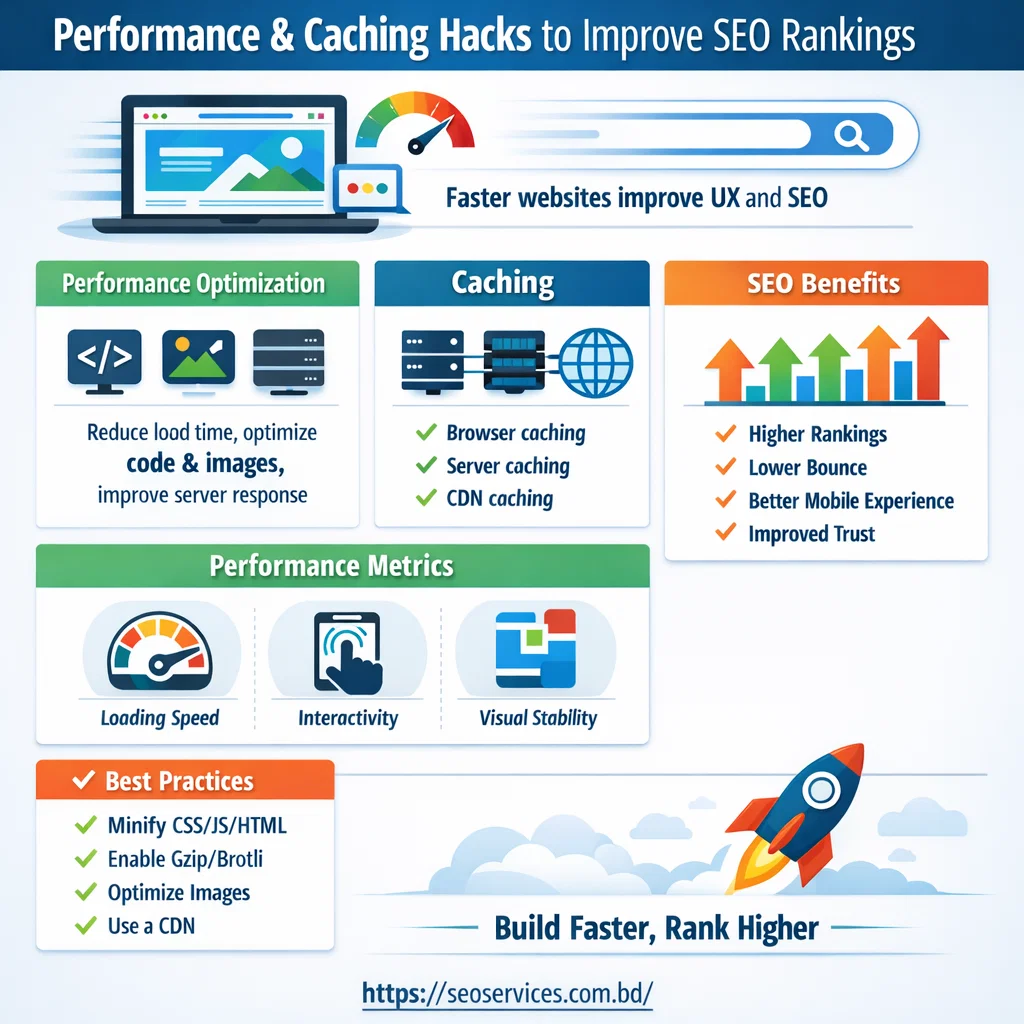
Performance & Caching for SEO Success
Website performance and caching are core parts of modern SEO. Search engines prefer fast, stable, and responsive websites. Users also expect pages to load quickly on both desktop and mobile devices.
Performance and caching optimization help reduce load time, improve usability, and boost search rankings. A well-optimized site builds trust and drives better conversions.
Why Website Performance Is Critical for SEO
Website speed directly affects search engine rankings. Slow websites often lose visitors before the page fully loads.
Fast websites deliver a better user experience and stronger engagement signals. These signals help search engines understand that your site provides value.
Key SEO benefits of strong website performance:
- Higher visibility in search results
- Lower bounce rates
- Better mobile experience
- Increased user trust and engagement
Performance optimization is no longer optional for SEO growth.
Understanding Website Performance
Website performance refers to how fast and smoothly a website loads and responds. It includes both front-end and server-side factors.
Performance elements that affect SEO:
- Page load speed
- Server response time
- Image and media optimization
- Code efficiency
Optimizing these areas improves both user satisfaction and rankings.
What Is Caching and Why It Matters
Caching is a technique that stores website data temporarily. It allows pages to load faster for returning visitors. Instead of requesting fresh data each time, cached content loads instantly. This reduces server strain and improves overall performance.
SEO advantages of caching:
- Faster page loading
- Reduced server workload
- Improved Core Web Vitals
- Better crawl efficiency
Caching plays a major role in sustainable SEO optimization.
Types of Caching Used for SEO
Different caching methods work together to improve speed and stability.
Browser Caching
Browser caching saves static files on a user’s device.
- Images, CSS, and JavaScript load faster
- Improves repeat visit speed
- Reduces unnecessary data requests
Server-Side Caching
Server caching stores processed content on the server.
- Reduces database queries
- Improves server response time
- Supports high-traffic websites
CDN Caching
CDN caching distributes content across global servers.
- Delivers content from the nearest location
- Improves global site speed
- Enhances reliability and uptime
Using all three provides the best performance results.
Performance Metrics That Matter for SEO
Search engines measure website speed using specific metrics. These metrics are part of Google’s Core Web Vitals.
Important performance metrics include:
- Largest Contentful Paint (LCP) – measures loading speed
- First Input Delay (FID) – measures interactivity
- Cumulative Layout Shift (CLS) – measures visual stability
Improving these metrics strengthens your SEO foundation.
Tools to Measure Performance & Caching
Performance testing tools help identify speed problems. They also provide clear improvement recommendations.
Popular performance testing tools:
- Google PageSpeed Insights
- GTmetrix
- Pingdom
These tools analyze load time, caching status, and user experience.
Best Practices for Performance & Caching Optimization
Proper optimization follows tested and reliable techniques.
Proven optimization strategies:
- Minify CSS, JavaScript, and HTML
- Enable Gzip or Brotli compression
- Implement browser and server caching
- Optimize images and media files
- Use a trusted CDN service
These practices improve load speed and search performance.
How Our SEO Services Improve Performance & Caching
Our SEO team focuses on performance-driven optimization. We identify issues that slow down your website and fix them efficiently.
Our performance and caching services include:
- Full website speed audit
- Core Web Vitals optimization
- Advanced caching setup
- CDN configuration
- Ongoing performance monitoring
We align speed improvements with long-term SEO goals.
Why Choose Us for Performance & Caching SEO
We combine technical expertise with SEO best practices. Our strategies focus on measurable results and growth.
What you gain with our services:
- Faster website load times
- Better search engine rankings
- Improved user experience
- Higher conversion potential
Performance optimization supports every SEO campaign.
Conclusion: Build Faster, Rank Higher
Performance and caching are essential for SEO success. A fast website keeps users engaged and search engines satisfied. Ignoring performance issues can cost rankings and revenue. Let our experts optimize your website for speed, stability, and SEO growth.
FAQs: Performance & Caching Hacks to Improve SEO
1. What is caching, and why does it matter?
Caching stores website resources for faster load times. Faster pages improve user experience, reduce server load, and help SEO rankings.
2. How does site speed affect SEO?
Faster sites lower bounce rates, improve engagement, and are favored by Google. Core Web Vitals link speed to higher rankings.
3. Best performance hacks for SEO?
- Minify CSS, JS, and HTML
- Optimize images (WebP)
- Use browser and server caching
- Enable Gzip/Brotli compression
- Implement lazy loading
4. Should I use a CDN?
Yes. CDNs deliver content from servers near users, improving load speed globally and boosting SEO.
5. How often should I test site performance?
Regularly—monthly or after updates. Use tools like Google PageSpeed Insights, GTmetrix, or Pingdom.
6. Which performance metric matters most?
Core Web Vitals:
- LCP (loading speed)
- FID (interactivity)
- CLS (visual stability)
7. Can caching ever hurt SEO?
Yes, if outdated content is served. Always set proper cache expiration and clear caches after updates.
8. Difference between browser and server caching?
- Browser caching: stores files on the visitor’s device.
- Server caching: stores rendered pages on the server for faster delivery.
9. Are performance hacks hard to implement?
Some are easy (image optimization, caching plugins). Advanced tasks (CDN, minification) may need technical skills.
10. How long to see SEO improvements?
Usually within weeks to a few months. Search engines need time to recrawl and re-index optimized pages.