
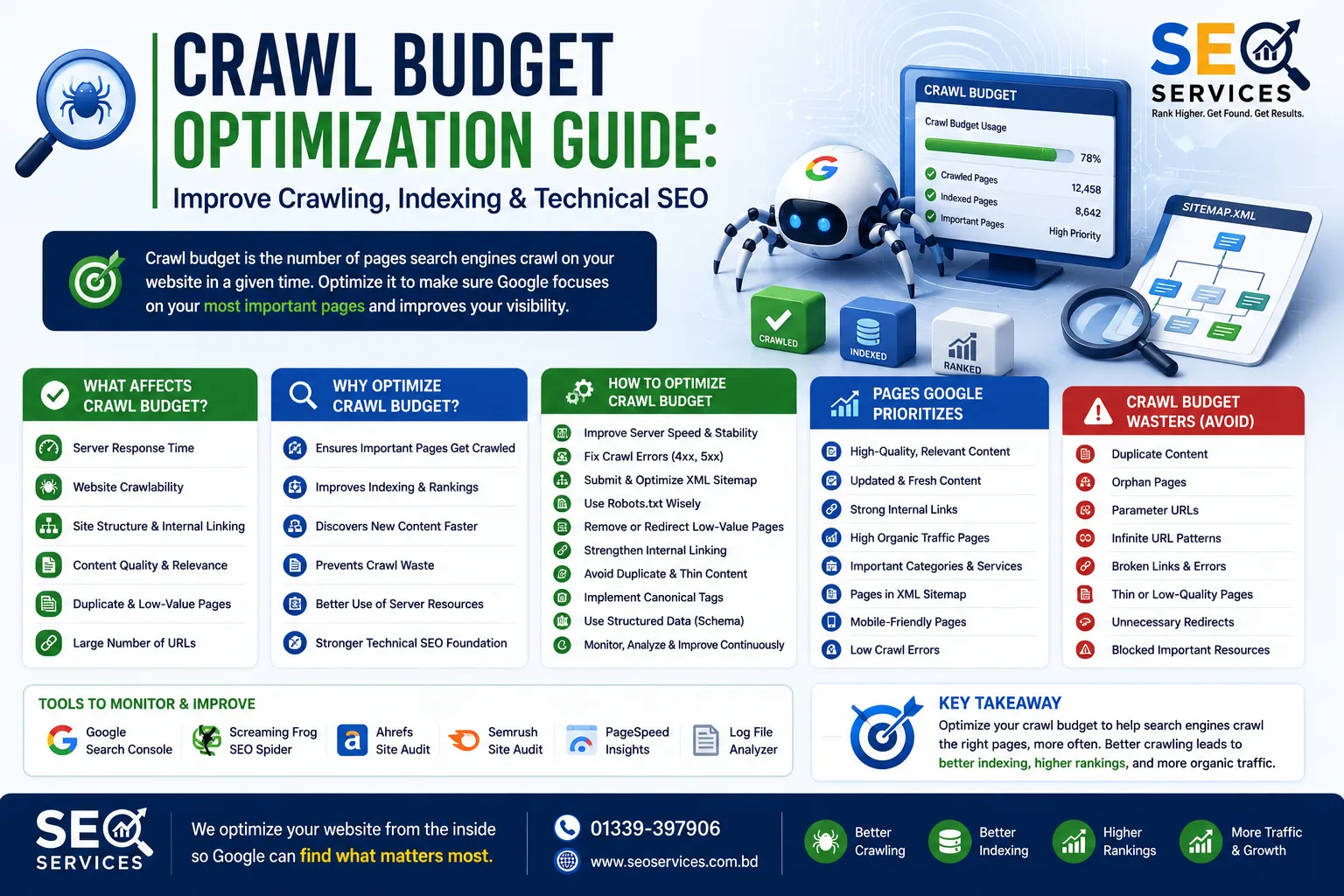
Understand How Search Engines Discover, Crawl, and Prioritize Your Website
Getting a page indexed by Google starts long before it appears in search results.
First, Google needs to discover the URL. Then it must crawl the page, process its content, determine whether it should be indexed, and finally evaluate where it belongs in search results.
For websites with only a few dozen pages, this process often happens naturally.
However, as websites grow, inefficient crawling can slow down content discovery, delay indexing, and reduce the efficiency with which search engines allocate their crawling resources.
This is where crawl budget optimization becomes important.
Crawl budget optimization is the process of helping search engines spend their available crawling resources on your most valuable pages instead of wasting time on duplicate URLs, unnecessary parameter pages, broken links, redirect chains, or other low-value content.
Although crawl budget is primarily a concern for larger websites, understanding how search engines crawl your site benefits every SEO strategy.
This guide explains:
- What crawl budget is
- How Googlebot crawls websites
- Crawl demand and crawl capacity
- Crawlability vs. indexability
- Common crawl issues
- Website architecture and crawl efficiency
- XML sitemaps
- Robots.txt
- Canonicalization
- Duplicate content
- Internal linking
- Crawl optimization best practices
Whether you manage a small business website, an enterprise platform, or a large eCommerce store, understanding crawl behavior helps build a stronger technical SEO foundation.
What Is Crawl Budget?
Crawl budget refers to the amount of crawling resources that a search engine allocates to a website over a period of time.
Instead of crawling every page on the internet continuously, search engines prioritize how they distribute their resources.
Large websites may contain:
- Hundreds of pages
- Thousands of pages
- Millions of URLs
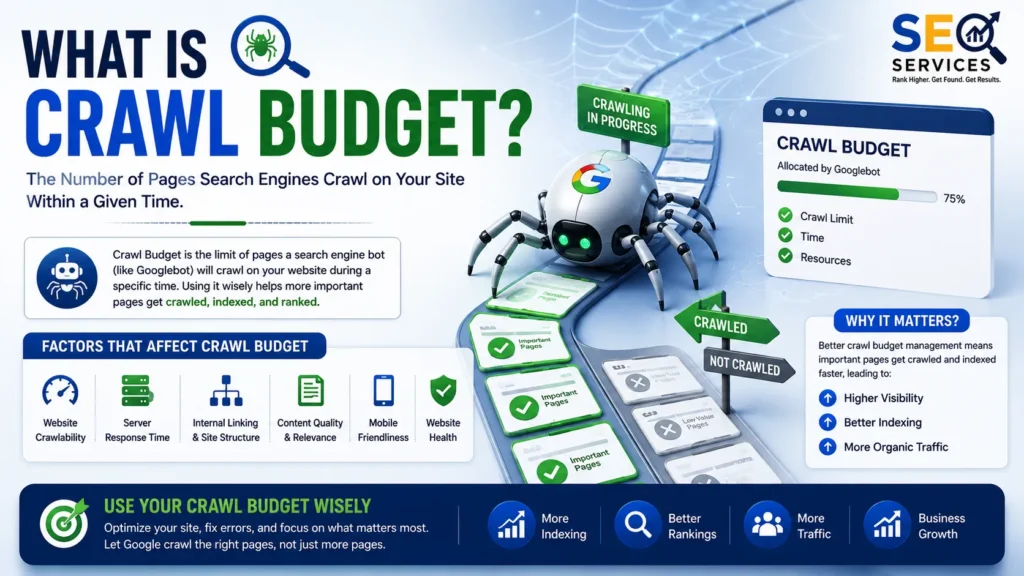
Search engines therefore need systems that decide:
- Which pages to crawl
- How frequently to crawl them
- Which pages deserve recrawling
- Which URLs can be ignored temporarily
The combination of these decisions is commonly referred to as crawl budget.
It is important to understand that crawl budget is not a ranking factor.
Instead, it affects how efficiently search engines discover and refresh content.
If important pages are crawled more efficiently, updates can potentially be processed faster.
Why Crawl Budget Matters
For very small websites with excellent technical health, crawl budget rarely becomes a limiting factor.
However, it becomes increasingly important for websites such as:
- Large eCommerce stores
- Real estate websites
- News publishers
- Job portals
- Marketplace platforms
- Travel websites
- Enterprise websites
- Government portals
- Large blogs
- SaaS knowledge bases
These websites often generate thousands of URLs through:
- Filters
- Categories
- Search pages
- Product variations
- Parameters
- Archives
- Pagination
- Tags
Without proper management, search engines may spend significant time crawling low-value URLs while delaying the discovery of important content.
What Is Googlebot?
Googlebot is Google’s web crawler.
Its job is to discover publicly accessible webpages across the internet.
Googlebot typically discovers pages through:
- Internal links
- External links
- XML sitemaps
- Previously known URLs
- Redirects
Once Googlebot discovers a page, it downloads available resources and evaluates:
- HTML
- Images
- CSS
- JavaScript
- Structured data
- Internal links
- External references
Google later determines whether the page should be indexed.
Crawling does not guarantee indexing.
Likewise, indexing does not guarantee rankings.
These are separate stages of the search process.
The Search Engine Discovery Process
A simplified workflow looks like this:
URL Discovery

↓

Crawling

↓

Rendering (when necessary)

↓

Content Processing

↓

Duplicate Detection

↓

Canonical Selection

↓

Indexing Decision

↓

Ranking Systems
Each stage depends on the successful completion of the previous one.
If Google never discovers the page, crawling cannot occur.
If crawling fails, indexing cannot occur.
Crawl Budget vs Indexing
These concepts are frequently confused.
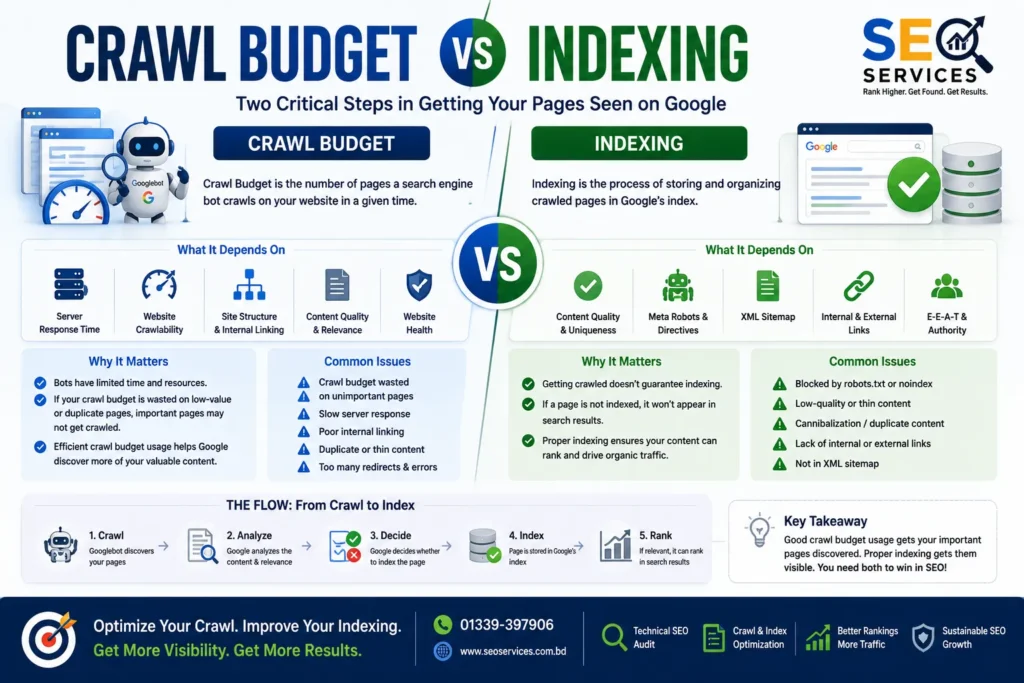
Crawling
Crawling means Googlebot visits a URL.
Indexing
Indexing means Google stores an eligible page within its search index.
A page may be:
- Crawled but not indexed
- Indexed but not ranking well
- Indexed but rarely shown
- Discovered but not yet crawled
Search Console often reports situations such as:
- Discovered – currently not indexed
- Crawled – currently not indexed
- Duplicate without user-selected canonical
- Alternative page with canonical
- Excluded by noindex
These are indexing decisions rather than crawl budget issues.
Crawl Budget vs Crawlability
Another common misconception is treating crawl budget and crawlability as the same thing.
They are different.
Crawl Budget
How many crawling resources are allocated.
Crawlability
Whether search engines can successfully access pages.
Poor crawlability may result from:
- Broken links
- Robots.txt blocks
- Server errors
- Authentication
- Infinite URL loops
- JavaScript rendering issues
- Incorrect redirects
A website with excellent crawl budget can still have poor crawlability.
Crawl Budget vs Indexability
Indexability determines whether a crawled page is eligible to enter Google’s index.
Examples of pages that may not be indexable include:
- Noindex pages
- Duplicate pages
- Soft 404 pages
- Empty pages
- Low-value pages
- Canonicalized URLs
Good crawlability does not automatically create good indexability.
Crawl Demand and Crawl Capacity
Google has explained crawl budget using two broad concepts:
Crawl Capacity
Crawl capacity relates to how much crawling a website can reasonably support without creating excessive server load.
Factors include:
- Server response time
- Server health
- Website stability
- Error rates
If a server begins returning many errors, Google may reduce crawling frequency.
Crawl Demand
Demand refers to Google’s interest in recrawling URLs.
Pages that change frequently may receive more attention.
Examples include:
- News articles
- Product inventory
- Category pages
- Frequently updated blogs
Pages that rarely change may be crawled less frequently.
What Influences Crawl Demand?
Several characteristics can influence how frequently pages are revisited.
Examples include:
- Content updates
- Fresh backlinks
- Internal linking
- User demand
- Historical importance
- Website popularity
Google has not published a simple scoring formula for crawl demand, and it should not be treated as a single measurable metric.
Instead, multiple systems likely contribute to recrawl scheduling.
Does Every Website Need Crawl Budget Optimization?
No.
Google has consistently indicated that crawl budget is generally more relevant for:
- Very large websites
- Websites with millions of URLs
- Sites generating many duplicate URLs
- Platforms with faceted navigation
- Large eCommerce stores
A local business website with 40 pages is unlikely to experience crawl budget limitations.
Nevertheless, following good crawl practices improves overall technical SEO regardless of website size.
Signs Crawl Budget May Be Wasted
Potential indicators include:
- Large numbers of duplicate URLs
- Parameter-based pages
- Infinite filter combinations
- Broken internal links
- Redirect chains
- Soft 404 pages
- Thin archive pages
- Crawl traps
- Low-value tag pages
- Session IDs in URLs
These issues may encourage crawlers to spend resources on pages that provide little search value.
Common Causes of Crawl Waste
Many websites unintentionally create excessive numbers of crawlable URLs.
Examples include:
URL Parameters
Example:
?color=blue

?sort=price

?session=12345

?ref=email
Poor parameter handling can generate thousands of URL variations.
Faceted Navigation
Online stores commonly allow filtering by:
- Brand
- Color
- Size
- Price
- Material
- Rating
Every combination may generate another crawlable URL.
Without careful management, these combinations can expand into hundreds of thousands of pages.
Duplicate Content
Duplicate URLs increase crawling workload.
Examples include:
https://example.com/page

https://example.com/page/

https://www.example.com/page

https://example.com/page?ref=facebook
These versions may represent essentially the same content.
Infinite Calendar Pages
Calendar plugins sometimes generate endless future and historical URLs.
Example:
January 2026

↓

February 2026

↓

March 2026

↓

...

↓

2055
Search engines may waste significant crawl resources exploring these pages.
Internal Search Pages
Many websites expose internal search results.
Example:
/search?q=seo

/search?q=seo+guide

/search?q=seo+services
Thousands of searchable combinations may exist.
These pages rarely deserve indexing.
Crawl Budget and Website Architecture
Website architecture has a significant influence on crawl efficiency.
A well-organized website helps search engines discover important pages quickly.
Characteristics include:
- Logical hierarchy
- Consistent navigation
- Clear categories
- Topic clusters
- Internal linking
- Reasonable crawl depth
Example:
Homepage

↓

SEO Services

↓

Technical SEO

↓

Crawl Budget Optimization Guide
This structure is considerably easier to understand than scattered orphan pages.
Flat vs Deep Architecture
Flat Architecture
Homepage

↓

Service

↓

Guide
Few clicks required.
Better discovery.
Deep Architecture
Homepage

↓

Category

↓

Subcategory

↓

Archive

↓

Topic

↓

Article
Too many levels can slow discovery of important pages.
Important content should generally remain accessible within a reasonable number of clicks from the homepage.
Internal Linking and Crawl Discovery
Googlebot primarily discovers pages through links.
Strong internal linking therefore improves crawl efficiency.
Every important page should receive contextual internal links from relevant pages.
Avoid creating important pages that receive little or no internal linking.
These become difficult for both users and crawlers to discover.
What Are Orphan Pages?
An orphan page has no internal links pointing toward it.
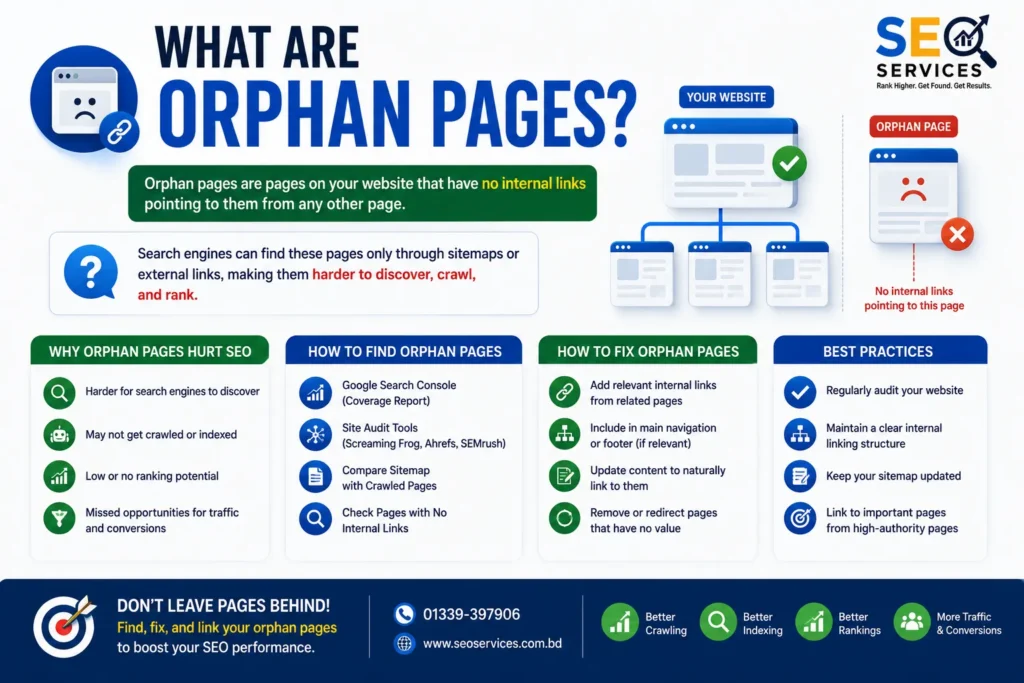
It may still exist in:
- XML sitemaps
- External backlinks
- Direct URLs
However, Googlebot has fewer natural discovery paths.
Orphan pages often receive less consistent crawling than well-connected pages.
XML Sitemaps and Crawl Budget
XML sitemaps help search engines discover URLs.
A sitemap does not guarantee:
- Crawling
- Indexing
- Rankings
Instead, it acts as a discovery resource.
High-quality XML sitemaps should generally contain:
- Canonical URLs
- Indexable pages
- Updated URLs
- Relevant pages
Avoid including:
- Redirects
- Noindex pages
- Soft 404s
- Broken pages
- Duplicate URLs
Clean sitemaps help search engines prioritize useful content.
Robots.txt and Crawl Budget
Robots.txt provides crawling instructions for compliant search engine bots.
Example uses include restricting crawling of:
- Admin folders
- Login pages
- Temporary files
- Certain parameter URLs
However, robots.txt should not be viewed as a universal crawl budget solution.
Blocking important resources or pages accidentally can create indexing problems.
Robots.txt controls crawling—not whether a page can ultimately appear in search results if it is discovered through other means.
Canonical Tags
Canonical tags help indicate the preferred version among substantially similar pages.
Example:
Product A

↓

Product A?ref=email

↓

Product A?sort=price
The canonical tag signals which version should generally be treated as the primary page.
This helps reduce duplicate content issues, although canonical tags are signals rather than absolute directives.
Pagination and Crawl Efficiency
Large category pages often span multiple pages.
Examples:
Page 1

↓

Page 2

↓

Page 3

↓

Page 20
Proper pagination helps search engines discover deeper products and articles.
Poor pagination can make valuable content difficult to reach.
Thoughtful internal linking and logical navigation improve crawl efficiency across paginated content.
Crawl Budget Myths
Several myths continue to circulate within the SEO community.
Myth 1: Crawl budget affects every website equally.
Reality: It is typically a greater concern for large, complex websites than for small sites.
Myth 2: More crawling automatically improves rankings.
Reality: Crawling is only one step. Content quality, relevance, and ranking systems determine search performance.
Myth 3: Blocking everything in robots.txt improves crawl budget.
Reality: Incorrect robots.txt rules can create more problems than they solve.
Myth 4: Every indexed page is crawled frequently.
Reality: Crawl frequency varies depending on many factors, including content changes and Google’s assessment of demand.
Key Takeaways
Understanding crawl budget begins with understanding the relationship between discovery, crawling, rendering, indexing, and ranking.
For most websites, the biggest opportunities are not increasing crawl budget—they are using existing crawl resources more efficiently by improving website architecture, internal linking, eliminating duplicate URLs, maintaining clean XML sitemaps, and reducing unnecessary crawl paths.
In Part 2, we’ll cover advanced crawl budget optimization techniques, including log file analysis, crawl depth optimization, JavaScript SEO, redirect management, orphan page recovery, faceted navigation strategies, enterprise-scale audits, and a complete crawl budget optimization checklist.
Advanced Crawl Budget Optimization: Technical SEO Best Practices
Once a website has a solid technical foundation, the next step is improving how efficiently search engines spend their crawling resources.
Crawl budget optimization is not about forcing Googlebot to crawl more pages.
Instead, the objective is to make it easier for search engines to discover, prioritize, and revisit the pages that matter most.
A technically healthy website reduces unnecessary crawling while improving the accessibility of valuable content.
This section covers practical optimization techniques suitable for modern websites, including eCommerce stores, SaaS platforms, publishers, enterprise websites, and large content hubs.
Improve Internal Linking for Better Crawl Efficiency
Internal links are one of the primary ways search engines discover webpages.
Every important page should receive contextual links from relevant pages throughout the site.
Rather than thinking only about PageRank distribution, consider internal linking as a way to guide crawlers through your website.
A strong internal linking strategy should:
- Connect pillar pages with supporting articles.
- Link related services and resources naturally.
- Reduce crawl depth for important pages.
- Surface newly published content quickly.
- Eliminate isolated content.
For example:
Homepage
   ↓
Technical SEO
   ↓
Crawl Budget Guide
   ↓
Log File Analysis Guide
   ↓
XML Sitemap Guide
This hierarchy clearly communicates topical relationships while improving crawl discovery.
Reduce Crawl Depth
Crawl depth refers to the number of clicks required to reach a page from the homepage.
Example:
Homepage
 ↓
Category
 ↓
Subcategory
 ↓
Guide
This page has a crawl depth of approximately three clicks.
Pages buried too deeply may receive less frequent crawling than pages that are easily accessible.
Good practices include:
- Keeping important pages close to the homepage.
- Creating logical category structures.
- Linking related articles together.
- Using breadcrumbs.
- Avoiding unnecessary navigation layers.
There is no official maximum crawl depth, but reducing unnecessary complexity generally improves crawl efficiency.
Eliminate Orphan Pages
An orphan page has no internal links pointing to it.
Although search engines may discover orphan pages through:
- XML sitemaps
- External backlinks
- Previously indexed URLs
they are still more difficult to discover and revisit consistently.
Common causes include:
- Old blog posts
- Deleted category pages
- Poor site migrations
- New content never linked internally
Regular site audits should identify orphan pages and either:
- Add contextual internal links.
- Merge the content.
- Redirect outdated pages.
- Remove low-value URLs.
Optimize XML Sitemaps
An XML sitemap should act as a high-quality list of URLs that deserve crawling.
Avoid including:
- Redirected URLs
- Canonicalized URLs
- Noindex pages
- Soft 404 pages
- Broken pages
- Parameter URLs
Instead, include:
- Canonical URLs
- Indexable pages
- Recently updated content
- High-value landing pages
For large websites, separate sitemaps by content type, for example:
- Posts
- Pages
- Products
- Categories
- Videos
- Images
This improves sitemap organization and monitoring in Google Search Console.
Maintain a Clean Robots.txt File
Robots.txt helps guide compliant search engine crawlers away from unnecessary areas of a website.
Examples include:
/wp-admin/
/cart/
/checkout/
/search/
/login/
However, robots.txt should not be used to hide valuable content from search engines.
Important reminders:
- Blocking a page does not automatically remove it from search results.
- Robots.txt controls crawling, not indexing.
- Incorrect rules can accidentally block CSS, JavaScript, or important sections of a website.
Review robots.txt regularly after website redesigns and migrations.
Consolidate Duplicate URLs
Duplicate URLs waste crawl resources.
Common examples include:
HTTPS vs HTTP

WWW vs Non-WWW

Trailing slash variations

Uppercase URLs

Tracking parameters

Session IDs

Print versions
Use appropriate canonical tags and redirects where necessary to consolidate duplicate content.
Reducing duplicate URLs allows search engines to spend more time crawling unique content.
Optimize Faceted Navigation
Faceted navigation is common on eCommerce websites.
Examples include filters for:
- Brand
- Size
- Color
- Material
- Availability
- Price
- Rating
Every possible filter combination may generate another crawlable URL.
For example:
Shoes

↓

Brand=Nike

↓

Color=Black

↓

Size=10

↓

Price<$100
Multiply these combinations across thousands of products and the number of URLs can become enormous.
Possible management strategies include:
- Canonicalization
- Robots directives where appropriate
- Parameter handling
- Controlled indexation
- Logical filtering rules
The objective is to ensure search engines prioritize pages with genuine search value.
Fix Redirect Chains
Redirect chains increase crawling complexity.
Instead of:
Page A

↓

301

↓

Page B

↓

301

↓

Page C
Use:
Page A

↓

301

↓

Page C
Reducing redirect hops improves crawl efficiency and simplifies URL management.
Eliminate Redirect Loops
Redirect loops prevent successful crawling.
Example:
A

↓

B

↓

C

↓

A
Search engines eventually abandon these requests.
Regular technical SEO audits should identify redirect loops before they affect crawling.
Resolve Broken Links
Broken internal links waste crawl resources.
Examples include:
- Deleted products
- Removed blog posts
- Incorrect URLs
- Typographical errors
Common server responses include:
- 404 Not Found
- 410 Gone
Fix broken links by:
- Updating URLs
- Adding redirects when appropriate
- Removing obsolete references
Reduce Soft 404 Pages
Soft 404s occur when pages appear empty or provide little useful information while still returning a successful HTTP status code.
Examples include:
- Empty search results
- Thin category pages
- Deleted products without proper handling
- Placeholder content
These pages consume crawl resources without providing meaningful value.
Improve Server Performance
Googlebot adjusts crawling partly according to server responsiveness.
Slow or unstable hosting may reduce crawl activity.
Best practices include:
- Fast hosting
- Reliable uptime
- HTTP/2 or HTTP/3 support
- Compression
- Efficient caching
- Optimized database queries
- CDN implementation where appropriate
Good performance benefits both users and crawlers.
JavaScript and Crawl Budget
Modern websites frequently depend on JavaScript.
If critical content only appears after complex client-side rendering, search engines may require additional resources to process the page.
Recommendations include:
- Server-side rendering where appropriate
- Static rendering for large content sites
- Progressive enhancement
- Accessible HTML structure
- Avoid hiding important content exclusively behind JavaScript interactions
The goal is not to eliminate JavaScript but to ensure important content remains accessible.
Improve URL Structure
Clean URLs assist both users and search engines.
Example:
Good:
example.com/technical-seo/crawl-budget-guide/
Less desirable:
example.com/index.php?id=4837&category=seo&page=17
Good URL characteristics include:
- Descriptive
- Readable
- Stable
- Logical hierarchy
- Lowercase
- Hyphen-separated
Optimize Website Architecture
Strong architecture improves crawl efficiency.
A recommended structure:
Homepage

↓

SEO Services

↓

Technical SEO

↓

Technical SEO Guides

↓

Crawl Budget Optimization Guide
Related content should remain interconnected through contextual internal links.
Avoid isolated content silos that cannot be reached naturally.
Log File Analysis
Log files record requests made to your server.
Analyzing logs helps answer questions such as:
- Which pages Googlebot crawls most frequently?
- Which pages receive little attention?
- Are bots wasting resources on parameter URLs?
- Are important pages rarely crawled?
- Are crawl errors increasing?
Large enterprise websites often use log file analysis to identify crawl inefficiencies that traditional SEO tools cannot easily detect.
Monitor Crawl Statistics
Google Search Console provides Crawl Stats reports showing:
- Crawl requests
- Response codes
- Response times
- File types
- Discovery methods
Monitoring trends over time can help identify:
- Server problems
- Crawl spikes
- Unexpected decreases
- Resource issues
Use these reports as diagnostic tools rather than performance scores.
Improve Content Quality
Low-value pages increase crawl demand without adding meaningful value.
Examples include:
- Thin articles
- Duplicate pages
- Auto-generated archives
- Empty category pages
- Outdated content
Improvement options:
- Expand content
- Consolidate overlapping pages
- Redirect obsolete URLs
- Remove unnecessary pages
- Merge similar articles
Higher-quality websites generally make more efficient use of crawl resources.
Large Website Crawl Budget Strategy
Enterprise websites often require structured crawl management.
Typical priorities include:
High Priority
- Core landing pages
- Product pages
- Service pages
- Category pages
- Updated articles
Medium Priority
- Supporting resources
- Evergreen blog content
- FAQs
Lower Priority
- Search results
- Filters
- Archived pages
- Tag pages
- Temporary URLs
Not every page deserves equal crawl attention.
Crawl Budget Audit Checklist
Review the following areas:
Technical Health
- Server errors
- Broken links
- Redirect chains
- Redirect loops
- HTTPS consistency
Crawlability
- Robots.txt
- XML sitemaps
- Internal links
- Navigation
- Crawl depth
Duplicate Content
- Canonicals
- Parameters
- Session IDs
- WWW consistency
- HTTP redirects
Content Quality
- Thin pages
- Duplicate pages
- Orphan pages
- Soft 404s
- Outdated articles
Website Architecture
- Logical hierarchy
- Topic clusters
- Breadcrumbs
- Category organization
- Contextual linking
Common Crawl Budget Mistakes
Avoid these common issues:
- Blocking important pages in robots.txt.
- Including redirected URLs in XML sitemaps.
- Publishing thousands of thin pages.
- Ignoring orphan pages.
- Creating excessive redirect chains.
- Leaving duplicate parameter URLs crawlable.
- Building unnecessarily deep navigation.
- Neglecting internal linking.
- Allowing broken links to accumulate.
- Assuming crawl budget alone improves rankings.
Crawl Budget and AI Search
As AI-powered search systems continue to evolve, discoverability remains essential.
Search systems must first:
- Discover pages.
- Crawl them.
- Process their content.
- Understand entities and relationships.
- Determine relevance.
A technically optimized website supports these foundational processes.
While crawl budget optimization does not directly improve AI visibility, it complements broader strategies such as:
- Technical SEO
- Semantic SEO
- Entity SEO
- Knowledge Graph optimization
- Structured data
- Internal linking
- Topical Authority
- Answer Engine Optimization (AEO)
- Generative Engine Optimization (GEO)
Together, these practices create a website that is easier for both traditional search engines and modern AI-driven systems to understand.
Conclusion
Crawl budget optimization is about efficiency, not volume.
The objective is not to make Googlebot crawl every possible URL but to ensure it spends its resources on the pages that provide the greatest value to users and your business.
A strong crawl budget strategy combines:
- Clean website architecture
- Logical internal linking
- Optimized XML sitemaps
- Thoughtful robots.txt rules
- Canonicalization
- High-quality content
- Fast server performance
- Ongoing technical SEO audits
When these elements work together, search engines can discover, crawl, and process your most important content more effectively.
For growing websites, especially those with thousands of URLs, crawl budget optimization becomes an essential part of maintaining long-term technical SEO health and supporting sustainable organic search performance.
Frequently Asked Questions
What is crawl budget optimization?
Crawl budget optimization is the process of improving how efficiently search engines discover and crawl important pages while reducing time spent on unnecessary or duplicate URLs.
Is crawl budget a Google ranking factor?
No. Crawl budget is not a direct ranking factor. However, efficient crawling can help search engines discover and revisit valuable content more effectively.
Which websites benefit most from crawl budget optimization?
Large websites, eCommerce stores, publishers, marketplaces, enterprise sites, and platforms with thousands of URLs typically benefit the most.
How can I improve crawl efficiency?
Improve internal linking, reduce duplicate URLs, maintain clean XML sitemaps, fix crawl errors, simplify website architecture, optimize redirects, and manage faceted navigation appropriately.
Does robots.txt save crawl budget?
Robots.txt can help prevent crawling of unnecessary sections, but it should be implemented carefully because incorrect rules can block important resources or pages.
Should parameter URLs be indexed?
Not always. Many parameter URLs provide little unique value and may create duplicate content or unnecessary crawl paths. Their handling depends on the site’s architecture and search intent.
Do XML sitemaps improve rankings?
No. XML sitemaps help search engines discover URLs but do not directly influence rankings.
Why are orphan pages a problem?
Without internal links, orphan pages are harder for search engines and users to discover, which can reduce crawl frequency and visibility.
What is crawl depth?
Crawl depth refers to the number of clicks required to reach a page from the homepage. Important pages should generally be accessible through a logical, efficient navigation structure.
Does crawl budget matter for small websites?
Usually not. Most small websites are unlikely to experience crawl budget limitations, but maintaining good technical SEO practices still supports efficient crawling and indexing.